
Flexible Tactile Sensor Design Using FPCB Processing for Robotic and Industrial Applications
A Flexible Tactile Sensor is a thin contact-sensing device that reads pressure, temperature, hardness and surface material at the point of touch. FPCB processing turns this design into a low-cost, short-lead-time part with high yield, which makes it practical for robotic and industrial equipment. This page follows the layered structure used in the tactile-sensing literature — mechanism, high-resolution taxel layout, three-axis force detection, applications and outlook — and maps each layer onto a producible FPCB build.
How a Flexible Tactile Sensor Works
Figure 1 shows the schematic diagram of the flexible tactile sensor proposed in this paper. For illustrative purposes, only one tactile cell is depicted.
The upper electrode and lower electrode are embedded in the upper electrode layer and lower electrode layer respectively, separated by an intermediate spacer layer. This configuration forms a capacitor between the two electrodes, constituting a tactile unit.
When an external force acts upon the contact point above the tactile cell, the distance between the upper and lower electrodes changes, causing a variation in the capacitance value of that cell. By detecting this capacitance change using a dedicated signal detection circuit, the magnitude of the force applied to the contact point can be calculated.

Fig. 1 Schematic diagram of sensel without a shield
To shield against external electromagnetic interference and minimize the impact of surface charges on the measured object, another FPCB structure with a shielding layer was designed for experimentation. This structure features a fully copper-filled and grounded top layer on the upper electrode layer FPCB, as illustrated in Figure 2.

Fig. 2 Schematic diagram of sensel with a shield
Array Configuration and Signal Acquisition
In the proposed tactile sensor, the tactile elements are arranged in an array configuration. To simplify wiring, the upper and lower electrodes are shared. The capacitive surface array signal of the entire tactile sensor is read out in an array-like manner through the detection circuit. This signal is transmitted in real-time to the host computer.
After processing, the force distribution across the entire upper surface of the tactile sensor can be determined. The tactile units of the designed sensor form an 8 × 8 array with a spatial resolution of 5.08 mm and an effective detection area of approximately 9 cm × 9 cm.
Fabrication and Assembly of the Tactile Sensor
The proposed tactile sensor adopts a “sandwich” structure, primarily composed of three laminated layers: an upper electrode layer, a lower electrode layer, and an intermediate spacer layer.
Both the upper and lower electrode layers are fabricated using FPCB technology, with the upper electrode traces routed on the bottom layer of the upper electrode layer and the lower electrode traces on the top layer of the lower electrode layer. Figure 3 shows the finished upper and lower electrode layers after processing.
The intermediate spacer layer is made of silicone rubber. Rectangular cavities are etched at the positions corresponding to the upper and lower electrodes of each contact point. This design maximizes the deformation of the upper electrode layer under contact force, thereby enhancing the sensor’s sensitivity.
A circular silicone block is affixed directly above each contact point as the sensing surface. This further increases sensitivity while protecting the sensor’s upper surface from scratches when exposed to foreign objects.

Fig.3 Photos of fabricated FPCB
To facilitate detection of the sensor’s capacitive signals, the upper and lower electrodes of the sensor are routed to the same side of the sensor via leads within the FPCB.
The signals are then transmitted to the signal detection circuit through the FPCB connection lines. Figure 4 shows the finished sensor product, demonstrating that the designed tactile sensor exhibits excellent flexibility.

Fig. 4 Photo of the designed tactile sensor
Flexible Tactile Sensor FPCB Process: Step by Step
A standard flex workflow carries the sensor from design to finished part in five stages. Each stage maps to one part of the structure.
1. Stack build – a Flexible Copper-Clad Laminate pairs polyimide film with copper foil.
2. Etching – the copper is patterned into upper and lower electrodes plus routing.
3. Coverlay – a protective film covers the traces and leaves the contact pads open.
4. Spacer layer – the gap between the two electrode layers is set at this step.
5. Finish and assembly – surface finish, connector attach and electrical test close the build.
Note that polyimide (PI) is itself one of the polymers used in tactile sensor research. Therefore, the base material and the sensing concept point in the same direction.
FPCB Design Rules for Tactile Arrays (DFM)
Most public work on tactile sensing stops at the laboratory prototype. The manufacturing detail that decides whether a design can be produced repeatably is the DFM rule set. The main parameters are:
| Design item | Typical choice | Why it matters |
|---|---|---|
| Base substrate | Polyimide (PI), 25 µm or 50 µm | Dimensional stability under lamination and bending; withstands reflow-class temperature |
| Copper thickness | 12 µm or 18 µm RA/ED foil | Thinner foil gives cleaner etch for fine electrode gaps and better bend fatigue |
| Coverlay | PI coverlay with acrylic or epoxy adhesive, or photoimageable coverlay for fine openings | Protects traces while keeping the electrode face exposed and flat |
| Minimum trace / space | 75/75 µm standard, 50/50 µm for dense routing | Sets how many taxels can be routed out of a given array footprint |
| Electrode gap (cell gap) | Defined by spacer thickness, typically 50–300 µm | Directly sets sensitivity and force range |
| Bend radius | Static 1–2 mm for thin stacks; dynamic bending needs a larger radius and rolled-annealed copper | Determines whether the sensor survives a curved gripper jaw or a moving joint |
| Shielding | Dedicated copper pour or shielding layer on a separate FPCB layer, tied to ground | Suppresses EMI and stray surface charge |
| Stiffener / backer | FR4 or PI stiffener under the connector tail only | Keeps the connector reliable without killing the flexibility of the sensing area |
Fix these rules at design review. Changing spacer thickness or trace width later re-opens both the mechanical fit and the calibration, so the DFM check should happen before artwork release.
High-Resolution Sensing and Taxel Layout
Resolution in a tactile array is set by the taxel — the individual sensing cell — and by how densely the taxels are placed. A higher array density resolves smaller contact features, edge contact and slip onset, but it also raises the routing count and the risk of crosstalk between neighbouring cells.
Crosstalk comes from three places: capacitive coupling between adjacent electrodes, shared routing returns, and mechanical coupling through the spacer layer. All three are controllable at layout stage:
- Electrode geometry – keep a guard gap between cells and add a ground trace between columns where density is high.
- Routing discipline – route columns and rows on opposite layers, with the shield layer between the array and the tail.
- Spacer stiffness – a stiffer spacer limits mechanical bleed between cells, at some cost in conformability.
- Scanning scheme – sequential row/column scanning with a settling delay removes most residual coupling, at the cost of sample rate.
| Parameter | Configurable direction | Design note |
|---|---|---|
| Taxel pitch | 2 mm to 10 mm | 2–4 mm resolves fine contact and edge slip; 6–10 mm suits large-area coverage |
| Array size | Up to 32 × 32 taxels per panel | Larger areas are tiled, with the tile seam accounted for in calibration |
| Crosstalk | Suppressed by guard traces and settling time | Specify as a percentage of full scale at design review |
| Spatial resolution | Set by pitch, not by ADC bit depth | Increasing ADC resolution does not recover lost spatial detail |
For most robotic and industrial tasks, 4–6 mm pitch is the practical balance: enough detail for grasp stability and contact location, without an unmanageable tail and connector count.
3D Force Detection: Normal and Shear
A single-electrode-pair cell measures normal force only. Three-axis sensing needs a cell layout that resolves the tangential component as well. The common FPCB-compatible approach is a four-electrode cluster around a central contact bump: normal load shifts all four capacitances together, while a shear load shifts them differentially. The ratio between the sum and the difference separates normal from tangential force.
| Axis / parameter | How it is derived | Configurable target (project-dependent) |
|---|---|---|
| Normal force (Fz) | Sum of the four cell signals | 0.1 N to 50 N full scale, set by spacer thickness and electrode area |
| Shear force (Fx, Fy) | Difference between opposing cells | Typically 20–50 % of the normal full scale |
| Moment / torsion | Cross-pair difference across a cluster | Available when a cluster of four or more taxels is treated as one unit |
| Resolution | ADC bit depth plus noise floor of the front end | 12-bit typical for general grasping, 16-bit for slip detection |
| Sample rate | Row/column scan time × number of rows | 100 Hz to 1 kHz for closed-loop grip control |
| Hysteresis | Spacer material and electrode surface treatment | Specified as a percentage of full scale over the working range |
Three-axis output changes what a robot can do with the signal: normal force alone supports grip-force limiting, while shear supports slip detection and in-hand manipulation. If the application only needs contact presence and load, a single-axis layout is cheaper and simpler to calibrate.
Multimodal Sensing: Pressure and Temperature
Pressure and temperature can share one FPCB stack. The pressure cells use the capacitive layer as described above. A temperature channel is added as a thin-film resistive element (meander of copper or a deposited metal trace) placed on the same polyimide substrate, close to but thermally decoupled from the contact bump.
This gives three practical benefits:
- Temperature compensation – the readout can correct the pressure channel for thermal drift instead of specifying it as an error.
- Material and contact-state inference – a hot contact surface and a cold one behave differently in grasping; temperature is a second, independent feature.
- Extensibility – the same FPCB flow can carry humidity, a heater ring, or an inductive proximity coil on spare layers, so a later revision does not need a new process.
The constraint is layout budget: every added channel consumes routing space and tail pins. Plan the tail pinout for the final configuration at the first prototype, not the last.
Robotic Tactile Sensor Design: Tuning Sensitivity, Linearity and Range
A robotic tactile sensor design starts from the task, not the stack. Experiments on this structure show that sensitivity, linearity and measurement range can all be adjusted. Two levers control them: the FPCB processing parameters and the thickness of the spacer layer.
The spacer layer sets how far the electrodes can travel before they touch. The process parameters set electrode geometry and surface condition. As a result, one basic stack can serve a light-touch gripper and a higher-force industrial contact point. Designers should fix the target range first, then tune the spacer and the process.
Sensor Technology Comparison
The table below places the FPCB capacitive build against the alternatives that appear most often in tactile-sensing work.
| Type | Sensing principle | Strengths | Limits |
|---|---|---|---|
| Capacitive, PDMS-based | Elastomer dielectric between electrodes | High flexibility and sensitivity, very conformable | Limited measurement range; elastomer creep and hysteresis; difficult to scale to fine pitch |
| Resistive (conductive rubber / FSR) | Contact resistance changes with load | Simple readout, low cost, wide force range | Drift and hysteresis; harder to get repeatable multi-touch without crosstalk |
| Piezoelectric (PVDF) | Charge generated by strain | Good dynamic response, self-powered sensing | Poor static force measurement; charge leakage needs conditioning |
| Fibre optic | Light intensity or wavelength shift under deformation | Immune to EMI, safe in strong-field environments | Bulky readout, harder to make thin and dense |
| Capacitive with FPCB | Electrode pairs on polyimide, spacer-defined gap | Adjustable sensitivity, linearity and range; low cost, short lead times, high yield; dense arrays feasible | Requires a readout front end and per-unit calibration |
FPCB-Integrated vs Traditional Assembled Sensors
| Aspect | Traditional assembled sensor | FPCB-integrated sensor |
|---|---|---|
| Layer count | Separate electrode films, spacer, shield, adhesive layers stacked by hand | Electrodes, spacer, shield and routing built in one lamination cycle |
| Thickness | Higher, with tolerance stack-up per layer | Lower and more consistent |
| Connector | Discrete crimp or ZIF tail added after assembly | Tail formed in the same panel, stiffener added under the pads |
| Unit-to-unit consistency | Depends on manual alignment | Set by artwork and lamination tooling |
| Assembly steps | Multiple | Fewer, with electrical test at panel level |
| Suitability for volume | Limited | Designed for panel-level mass production |
Hardware Overview
The hardware breaks into five blocks. This is the level at which an integrator should read the design before choosing a configuration.
| Block | Function | Options |
|---|---|---|
| Sensing array | Capacitive taxel grid on PI, with spacer-defined gap | Single-axis or three-axis clusters; 2–10 mm pitch; single panel or tiled |
| Shield layer | Grounded copper layer, either integrated or on a separate FPCB layer | Integrated for thin stacks; separate layer where the tail must exit sideways |
| Tail and connector | Routes array signals to the board | ZIF FPC connector, board-to-board, or solder pads with strain relief |
| Signal conditioning | Capacitance-to-digital conversion, multiplexing, temperature channel | Discrete AFE plus MCU, or a dedicated capacitance-to-digital IC |
| Interface | Digital or analogue output to the robot controller | I2C, SPI, UART, analogue voltage, or USB bridge |
System Design Examples
The following configurations show how the same stack is adapted. They are described as reference builds rather than fixed products.
| Application | Sensing need | Reference configuration |
|---|---|---|
| Collaborative robot gripper jaw | Grip force limiting, part-present detection | 8 × 8 array, 4 mm pitch, single-axis, I2C over a short tail, 200 Hz |
| Curved gripper finger | Contact location, slip onset | 4 × 12 array on a curved FPCB, 3 mm pitch, three-axis clusters, 500 Hz |
| Industrial bin picking | Robust presence and jam detection | Coarse 4 × 4 array, 10 mm pitch, wide force range, analogue output |
| Robot wrist / limb skin | Safe contact detection over a large area | Tiled panels, 8 mm pitch, single-axis, daisy-chained SPI |
| End effector with thermal contact | Material discrimination | Pressure array plus resistive temperature channel on the same tail |
Reliability, Drift and Test Qualification
Industrial deployment depends on numbers that prototypes rarely report. The qualification matrix below lists what should be characterised and specified per project.
| Test item | Method | What to specify |
|---|---|---|
| Bend fatigue | Cyclic bending around a defined mandrel radius at the mounting curvature | Cycles to defined resistance/capacitance shift; keep the sensing area unbent where possible |
| Temperature drift | Soak at low, ambient and high operating temperature, signal recorded unloaded and loaded | Drift as a percentage of full scale, with and without compensation |
| Hysteresis | Load–unload cycles across the working range | Hysteresis as a percentage of full scale |
| Creep | Sustained load over time | Signal change over the hold period |
| EMI | Operation next to motors and drives, with and without the shield layer | Residual noise floor at the readout |
| Ingress protection | Sealing of the tail exit and connector area | IP class achievable depends on the housing, not the FPCB alone |
| Electrical test | Panel-level open/short and capacitance screen | Test coverage and pass criteria agreed at prototype sign-off |
Test standards and acceptance levels should be agreed at the prototype stage, because the pass criteria drive both the spacer choice and the housing design.
Selection Guide: Range, Resolution, Array Size and Interface
| Requirement | Selection path |
|---|---|
| Low force, light touch (under 1 N) | Thicker spacer, larger electrode area, higher-resolution ADC |
| High force, industrial contact (up to tens of N) | Thinner spacer or stiffer spacer material, smaller electrode area, wide-range front end |
| Fine contact detail | Pitch of 2–4 mm, guard traces, sequential scanning |
| Large area coverage | Tiled panels at 6–10 mm pitch, daisy-chained interface |
| Slip or shear detection | Three-axis clusters, sample rate 500 Hz or above |
| Long cable runs to the controller | Digital interface (SPI/UART) with local conversion rather than analogue over a long tail |
| Multiple sensors on one bus | I2C with address selection, or SPI with separate chip selects |
| Fastest integration | Analogue output plus a known calibration curve, or a digital module with firmware included |
Work through range first, then resolution, then interface. Reversing that order usually forces a redesign of the tail and the front end.
Integration with Robot End Effectors
Mechanical and electrical integration decide whether the array performs as measured on the bench.
- Curvature adaptation – bend the FPCB only in the tail or in a dedicated transition zone. Keep the taxel area on a flat or gently curved surface, or pre-form the part to the jaw radius.
- Bonding – use a pressure-sensitive adhesive or a thin structural adhesive layer that does not flow into the cell gap. Air pockets under the sensor act as a soft spring and change the calibration.
- Connector and harness – anchor the tail with a strain relief and route it away from the gripping axis. Choose a ZIF connector with a locking bar for moving axes.
- Signal conditioning placement – put the conversion electronics close to the array; long analogue runs next to motor cables are the most common source of noise in field installations.
- Calibration workflow – zero with no load, then apply known loads at defined points; store per-unit gain and offset in the readout firmware. Recalibrate after any change of spacer thickness or mounting adhesive.
Documentation, SDK and Platform Compatibility
The integration package should contain enough to build without a support call.
- Datasheet – electrical and mechanical specification, force range, resolution, hysteresis, drift, and the calibration procedure.
- 2D and 3D drawings – DXF for the flat pattern and STEP for the assembled part, plus the tail and connector footprint.
- SDK and drivers – a Python library and a C/C++ driver for the readout board, with sample code for scanning, filtering and calibration.
- Platform support – ROS and ROS 2 driver packages, plus examples for common robot controllers and for Raspberry Pi and STM32 host boards.
- Community and support – a documentation portal, example projects, and a support channel for integration questions.
Cost, Lead Time and Customization Path
The customization flow follows the same five stages as the process, with review gates between them:
1. Requirement and DFM review
2. Artwork and stack design
3. Prototype build and electrical test
4. Application validation and calibration
5. Pilot run, then mass production
| Item | Indicative range (confirmed at quotation) |
|---|---|
| Prototype cycle | 5–15 working days after artwork release |
| Prototype quantity | 5–20 pieces, typically |
| MOQ for custom arrays | From a few hundred pieces; lower for standard layouts |
| Mass production lead time | 3–6 weeks depending on layer count and test coverage |
| Main cost drivers | Panel size and layer count, connector type, test coverage, calibration depth |
The dominant cost is not the polyimide or the copper; it is panel utilisation and the amount of per-unit calibration and test. Designing the array to fit a standard panel size is the single largest cost lever.
ROI and Total Cost of Ownership
| Cost element | Traditional assembled sensor | FPCB-integrated sensor |
|---|---|---|
| NRE | Tooling for each layer plus assembly fixtures | Artwork and lamination tooling, no mask set |
| Unit cost at volume | Higher material and assembly content | Lower, driven by panel utilisation |
| Assembly labour at the robot builder | Sensor plus separate mounting and wiring steps | Sensor, tail and connector handled as one part |
| Calibration effort | Per-unit, often manual | Per-unit, but storable in firmware and repeatable |
| Rework and scrap | Higher, from alignment errors | Screened at panel level |
| Change cost | New tooling per layer | New artwork revision |
For an engineering buyer, the comparison should be made over the life of the program: a lower unit price with higher assembly labour and calibration time often loses to a slightly higher unit price with fewer integration steps.
Compliance and Certification Path
Target markets typically require CE marking for the finished machine and RoHS compliance for the sensor assembly. The sensor is a component, so compliance is usually established at two levels:
- Material level – RoHS and REACH declarations for the polyimide, copper foil, coverlay adhesive and surface finish.
- Assembly level – the finished product’s CE marking relies on the sensor’s EMC behaviour; the shield layer and the grounding scheme of the tail are the parts that matter.
Flammability and biocompatibility requirements, where they apply, should be raised at design review because they constrain the coverlay and adhesive choice.
Experiment
Figure 5 shows the experimental setup for the calibration test. For ease of calibration, the designed flexible tactile sensor rested on a horizontal acrylic plate.
The push-pull force gauge remained secured to a vertical guide rail, with its probe positioned directly above the contact point. A precise micro-motion platform controlled the magnitude of vertical displacement to apply a specific normal force.

Fig. 5 Experiment apparatus of calibration
Sensor Calibration Experiment
Engineers fabricated three distinct FPCB types as the upper and lower electrode layers for the proposed tactile sensor: a 100 μm thick unshielded FPCB, a 200 μm thick unshielded FPCB, and a 200 μm thick shielded FPCB.
The spacer layer thickness also varied across three parameters: 200 μm, 300 μm, and 400 μm.
Based on the different FPCB structures and spacer layer thicknesses, a total of nine tactile sensors underwent fabrication.
Calibration experiments then investigated the relationship between FPCB structure, spacer layer thickness, and performance metrics such as measurement range and sensitivity.
Each sensor underwent three experiments, with results analyzed for measurement range, sensitivity, linearity, and repeatability.
Results for 100 μm Thick Unshielded FPCB
Figure 6 shows experimental results using an FPCB with a 100μm thick unshielded layer.

Fig. 6 Experiment results of 100 upm thick FPCB without shield layer
Table 1 shows the relevant characteristics of the tactile sensor on an FPCB with a 100 μm-thick unshielded electrode layer.
| 200 μm Thickness | 300 μm Thickness | 400 μm Thickness | |
|---|---|---|---|
| Measurement Range / N | 2 | 9.5 | 9.5 |
| Sensitivity (% / N) | 25.19 | 14.38 | 10.85 |
| Linearity Error (%) | 4.49 | 7.97 | 8.74 |
| Repeatability Error (%) | 7.44 | 5.00 | 4.61 |
As shown in Figure 6(a), when the spacer layer thickness is 200 μm, the sensor’s sensitivity curve shifts significantly downward when the force applied to the sensor’s sensing plane exceeds 2 N, indicating sensor overload.
To ensure good linearity and service life, we specify its measurement range as 2 N.
For spacer thicknesses of 300 μm and 400 μm, the measurement range is 9.5 N. As shown in Figures 6(b) and 6(c), the sensitivity curve exhibits good linearity within the 9.5 N range.
We therefore define its measurement range as 9.5 N. As shown in Table 1, when testing tactile sensors on FPCBs with a 100 μm electrode layer and no shielding layer, increasing the spacer layer thickness results in a larger measurement range but reduced sensitivity, while simultaneously decreasing repeatability error.
When the spacer layer thickness is 200 μm, the sensor’s range is significantly affected by overload linearity, making it suitable for applications requiring high sensitivity but low range.
Compared to a 400 μm spacer layer, a 300 μm spacer layer provides higher sensor sensitivity and smaller linearity error, but slightly poorer repeatability.
Results for 200 μm Thick Unshielded FPCB
Figure 7 shows the experimental results using a 200 μm thick FPCB without a shielding layer.
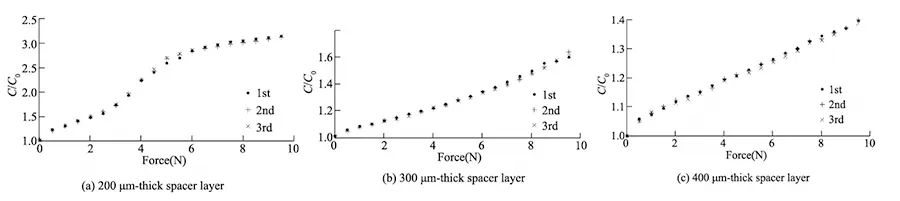
Fig. 7 Experiment results of 200 μm thick FPCB without shield layer
Table 2 shows the relevant characteristics of the tactile sensor on an FPCB with a 200 μm-thick unshielded electrode layer.
| 200 μm Thickness | 300 μm Thickness | 400 μm Thickness | |
|---|---|---|---|
| Measurement Range / N | 3 | 9.5 | 9.5 |
| Sensitivity (% / N) | 21.88 | 6.09 | 3.82 |
| Linearity Error (%) | 7.59 | 8.09 | 8.26 |
| Repeatability Error (%) | 4.31 | 5.72 | 3.88 |
As shown in Figure 7(a), when the spacer layer thickness is 200 μm, the slope of the sensor’s output sensitivity curve changes significantly when the applied force exceeds 3N, approaching overload.
To ensure good linearity and service life, the sensor’s measurement range is specified as 3 N at this point. For spacer thicknesses of 300 μm and 400 μm, the measurement range is 9.5 N.
As shown in Table 2, overall, the sensor’s sensitivity decreases with increasing spacer thickness.
At 200 μm spacer thickness, the sensor exhibits a smaller measurement range but higher sensitivity; while at 300 μm and 400 μm, the sensor exhibits higher sensitivity at the former thickness but slightly larger repeatability error, with linearity error remaining comparable.
Results for 200 μm Thick Shielded FPCB
Figure 8 presents experimental results using a 200 μm thick shielded FPCB.
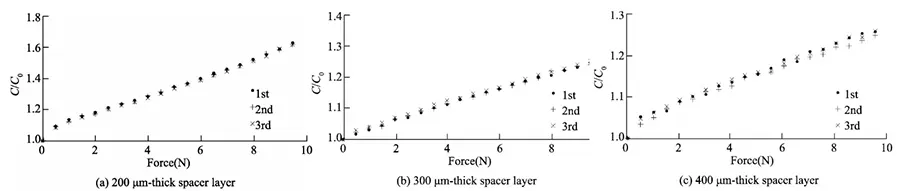
Fig. 8 Experiment results of 200 μm thick FPCB without shield layer
Table 3 shows the relevant characteristic parameters of the tactile sensor employing a 200 μm thick shielded FPCB as the electrode layer.
| 200 μm Thickness | 300 μm Thickness | 400 μm Thickness | |
|---|---|---|---|
| Measurement Range / N | 9.5 | 9.5 | 9.5 |
| Sensitivity (% / N) | 5.83 | 2.34 | 2.42 |
| Linearity Error (%) | 7.77 | 4.88 | 12.24 |
| Repeatability Error (%) | 2.83 | 5.60 | 7.89 |
Due to the copper layer deposited on the top electrode layer, which increases its hardness, the sensitivity of the shielded design decreases significantly compared to the unshielded design, as shown in Table 3.
However, observations on the host computer reveal that the tactile sensor with this design exhibits markedly reduced noise when contacting the test object. The shielded tactile sensor suits applications where high sensitivity isn’t needed but noise sensitivity matters.
These nine sets of experiments lead to the conclusion that as the spacer layer thickness increases, the sensor sensitivity decreases.
However, when the spacer layer thickness is 200 μm, the sensor sensitivity significantly improves compared to a 300 μm spacer layer. Under identical spacer layer thickness conditions, thicker and stiffer FPCBs exhibit lower sensitivity.
Demonstrate through experiments that designing different FPCB structures and spacer thicknesses enables development of tactile sensors with varying sensitivity, measurement ranges, and other specifications to meet diverse application requirements.
Sensor Array Experiment
Figure 9 (left) shows a colored pen cap inverted over the surface of the designed tactile sensor, with a finger applying light pressure.
Figure 9 (right) displays the grayscale image processed by the host computer. Comparing Figure 9 (left), the points with lower grayscale values correspond to the sensor elements pressed by the pen cap’s edge.
Areas not pressed by the cap show minimal grayscale variation, indicating that the designed sensor elements accurately detected pressure applied to the sensing surface.

Fig. 9 Experiment of a pen cap
Figure 10 (left) shows a standard tennis ball placed on the surface of the designed tactile sensor and pressed slightly.
The contact point at the bottom of the ball experiences the greatest force, while the surrounding contact points experience slightly less force. The contact elements not pressed by the ball remain unaffected.
The array detection results are shown in Figure 10 (right). The gray values at the contact point directly beneath the tennis ball are noticeably higher, while those along the outer edge show a slight decrease. Gray values at the unexposed areas remain largely unchanged.
The detection results align well with the actual conditions, indicating that the designed tactile sensor accurately detected the force distribution between the tennis ball and the sensor’s sensitive surface.

Fig. 10 Experiment of tennis
Array scanning experiments of the sensor demonstrated that the designed tactile sensor can detect tactile force signals on the sensor surface and visualize these signals on the host computer.
Outlook
The design confirms that an FPCB-built tactile cell can detect force applied to its sensing surface. Sensitivity, linearity and range stay adjustable for each task. With dense taxel layouts, three-axis clusters and a shared temperature channel, the same process covers applications from light-touch collaborative grippers to industrial contact points. Therefore, teams in robotic bionics, medical devices and industrial equipment can add artificial-skin sensing without carrying the cost of MEMS fabrication — and without the assembly burden of a hand-stacked sensor.
FAQ
What is a Flexible Tactile Sensor?
It is a thin sensor that reads properties of a contacted object through physical contact, such as temperature, pressure, hardness and material properties. The capacitive version pairs an upper and a lower electrode with a spacer layer, so applied force changes capacitance, and a signal detection circuit converts that change into a force value.
Why is the flexible tactile sensor FPCB route often better than MEMS?
MEMS fabrication brings cumbersome steps, high cost, long lead times and lower yield rates. FPCB processing delivers low cost, short lead times and high yield rates, and it supports mass production. For most projects, that difference matters at both the prototype and the volume stage.
How does a robotic tactile sensor design set sensitivity and range?
Two inputs can be tuned: the FPCB processing parameters and the thickness of the spacer layer. Together they shape sensitivity, linearity and measurement range. Hence a design team can keep one electrode pattern and change only the stack to match a new task.
How many taxels do I need, and what pitch should I choose?
Start from the smallest contact feature the robot must resolve. A 2–4 mm pitch resolves edge contact and slip onset; 6–10 mm pitch is enough for presence and grip-force coverage over a large area. More taxels also mean more routing and a longer scan time, so pick the coarsest pitch that still meets the task.
Can one sensor measure normal force, shear and temperature together?
Yes. Shear is resolved by comparing opposing cells in a cluster, and temperature is added as a resistive trace on the same polyimide substrate. The limit is tail pinout and routing budget, which is why the final channel count should be planned at the first prototype.
How is the sensor calibrated after mounting?
Zero the array with no load, apply known loads at defined points, and store per-unit gain and offset in the readout firmware. Repeat after any change to the spacer thickness, the mounting adhesive or the jaw geometry, because all three shift the force path into the cell.
What documentation and lead time should I expect?
A datasheet, DXF flat pattern, STEP model, connector footprint, and a Python and C/C++ driver make up the standard package, with ROS and ROS 2 drivers for robot integration. Prototypes typically run 5–15 working days after artwork release, with mass production lead times confirmed at quotation based on layer count and test coverage.
Related Posts
- Flexible PCB Gesture Recognition System for Wearables — Related article
- EMI Shielding Film for Flex Circuits: Selection Guide — Related article
- FPC Fingerprint Sensors Work — Related article
- Flexible Copper-Clad Laminate Guide — Related article
- Flexible PCB Buttons: Streamlining Modern Device Design — Related article